

JetEngine CCTS
Integration with Crocoblock's JetEngine plugin.
The GraphQL schema is provided fields to query Custom Content Type (CCT) data.
Root fields
| Field | Description |
|---|---|
jetengineCCTEntries | Returns a list of CCT entries (JetEngineCCTEntry type). |
jetengineCCTEntryCount | Returns the number of CCT entries. |
jetengineCCTEntry | Returns a single CCT entry (JetEngineCCTEntry type). |
The CCT slug must be provided via the slug argument (the CCT must be set as queryable in the plugin Settings, see below).
JetEngineCCTEntry type
On JetEngineCCTEntry type, we can query field values via:
| Field | Description |
|---|---|
id | The entry's database ID. |
uniqueID | A unique identifier for the entry, composed by the CCT slug and the entry's ID. |
cctSlug | The slug of the CCT this entry belongs to. |
status | The entry's status (e.g. publish, draft). |
createdDate | When the entry was created. |
createdDateStr | The entry's creation date, formatted as a string. |
modifiedDate | When the entry was last modified. |
modifiedDateStr | The entry's last modification date, formatted as a string. |
authorID | The ID of the entry's author. |
author | The author user connection object. |
singleCustomPostID | The ID of the linked single custom post, if any. |
singleCustomPost | The linked single custom post connection object. |
fieldValues | A JSON object with all CCT fields for that entry. |
fieldValue(slug) | To query a single field by slug. |
CCT field values
Values from fieldValue(slug) and from each key in fieldValues are cast according to the field type defined in the CCT.
Implicit ID fields (always cast to int when present and non-empty): id, singleCustomPostID, authorID.
How each CCT field type is cast in the GraphQL response:
float if decimal point; otherwise int.true for 1, true, yes, on (case-insensitive).int; "Both" → object { id, url }; else unchanged.int[].int; multiple → int[].The example below uses a CCT with slug "sample_cct" and fields of different types (text, number, gallery, etc).
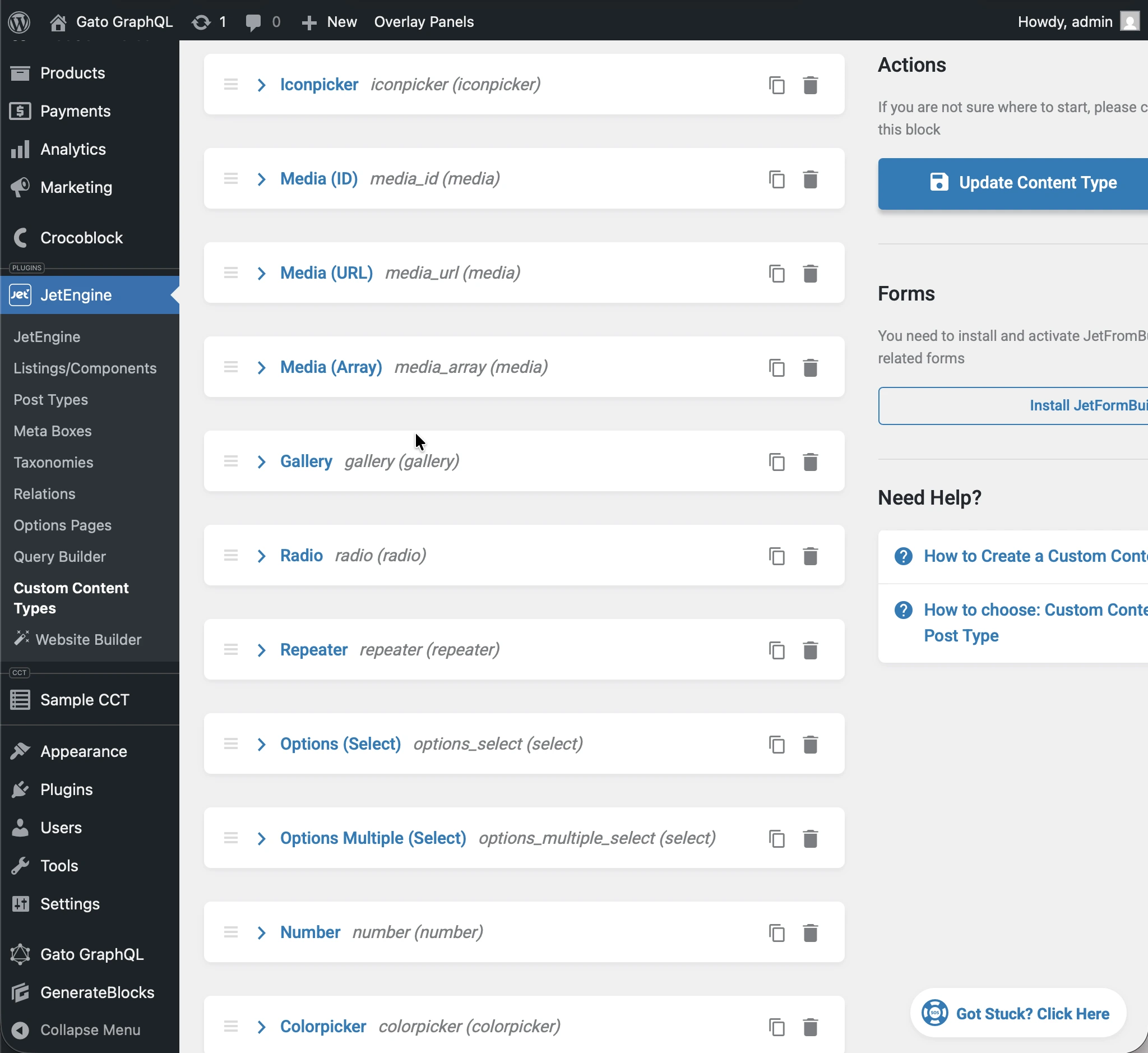
Executing the following query:
query JetEngineCCTEntries {
jetengineCCTEntry(cctSlug: "sample_cct", by: { id: 1 }) {
label_text: fieldValue(slug: "label_text")
textarea: fieldValue(slug: "textarea")
date: fieldValue(slug: "date")
time: fieldValue(slug: "time")
datetime: fieldValue(slug: "datetime")
wysisyg: fieldValue(slug: "wysisyg")
switcher: fieldValue(slug: "switcher")
checkbox: fieldValue(slug: "checkbox")
checkbox_array: fieldValue(slug: "checkbox_array")
iconpicker: fieldValue(slug: "iconpicker")
media_id: fieldValue(slug: "media_id")
media_url: fieldValue(slug: "media_url")
media_array: fieldValue(slug: "media_array")
gallery: fieldValue(slug: "gallery")
radio: fieldValue(slug: "radio")
repeater: fieldValue(slug: "repeater")
options_select: fieldValue(slug: "options_select")
options_multiple_select: fieldValue(slug: "options_multiple_select")
number: fieldValue(slug: "number")
colorpicker: fieldValue(slug: "colorpicker")
post: fieldValue(slug: "post")
posts: fieldValue(slug: "posts")
}
}...each field in the response is cast to its CCT type:
{
"data": {
"jetengineCCTEntry": {
"label_text": "Some label",
"textarea": "Some description here\r\n\r\nSome description there",
"date": "2026-01-24",
"time": "09:13",
"datetime": "2026-03-07T08:00",
"wysisyg": "<p>Some <strong>description</strong> here</p>\n<p><em>Some description</em> there</p>\n<p>Some <a href=\"https://gatoplugins.com\">link</a></p>\n",
"switcher": true,
"checkbox": {
"one": true,
"two": false,
"three": true
},
"checkbox_array": [
"one",
"two"
],
"iconpicker": "fa fa-road",
"media_id": 1362,
"media_url": "https://gatographql.com/wp-content/uploads/GatoGraphQL-logo.webp",
"media_array": {
"id": 1380,
"url": "https://gatographql.com/wp-content/uploads/Funny-Dog.jpg"
},
"gallery": [
1361,
1362,
1363
],
"radio": "1",
"repeater": [
{
"label_(text)": "First item in repeater",
"date": "2026-01-17",
"time": "11:00",
"datetime": "2026-01-16T11:16",
"textarea": "Gato GraphQL provides a multitude of interactive clients,",
"wysiwyg": "<p>Gato GraphQL provides a <strong>multitude of interactive clients</strong>, and a user interface based on the <a href=\"https://wordpress.org\">WordPress editor</a>, so that anybody can operate it, whether a developer or not.</p>\n",
"switcher": true,
"iconpicker": "fa fa-inbox",
"media_id": 1361,
"media_url": "https://gatographql.com/wp-content/uploads/Funny-Dog.jpg",
"media_array": {
"id": 1380,
"url": "https://gatographql.com/wp-content/uploads/Funny-Dog.jpg"
},
"gallery": [
1363,
1361
],
"radio": "two",
"options_select": "three",
"options_multiple_select": [
"two",
"four"
],
"number": 22,
"colorpicker": "#757575",
"post": 1140,
"posts": [
1,
2
]
},
{
"label_(text)": "Second item in repeater",
"date": "2026-01-15",
"time": "00:18",
"datetime": "2026-01-18T00:00",
"textarea": "These clients make it very easy to interact with Gato GraphQL",
"wysiwyg": "<p>These clients <strong>make it very easy to interact with Gato GraphQL</strong>, directly within the <em>wp-admin</em> (and without the need of any PHP code), reducing friction and removing barriers so that anyone (developers and non-developers alike) can use it.</p>\n",
"switcher": false,
"iconpicker": "fa fa-search-plus",
"media_id": 1362,
"media_url": "https://gatographql.com/wp-content/uploads/LICENSE.txt",
"media_array": {
"id": 1363,
"url": "https://gatographql.com/wp-content/uploads/LICENSE.txt"
},
"gallery": [
1380,
1361,
1362
],
"radio": "three",
"options_select": "three",
"options_multiple_select": [
"three"
],
"number": 4469,
"colorpicker": "#2d2270",
"post": 2,
"posts": [
1688,
1682
]
}
],
"options_select": "1",
"options_multiple_select": [
"one",
"two",
"five"
],
"number": 66778899,
"colorpicker": "#721abf",
"post": 1,
"posts": [
1140,
1113
]
}
}
}The same type casting applies to every field in the JSON returned by fieldValues:
query JetEngineCCTEntries {
jetengineCCTEntry(cctSlug: "sample_cct", by: { id: 1 }) {
fieldValues
}
}...which returns:
{
"data": {
"jetengineCCTEntry": {
"fieldValues": {
"label_text": "Some label",
"textarea": "Some description here\r\n\r\nSome description there",
"date": "2026-01-24",
"time": "09:13",
"datetime": "2026-03-07T08:00",
"wysisyg": "<p>Some <strong>description</strong> here</p>\n<p><em>Some description</em> there</p>\n<p>Some <a href=\"https://gatoplugins.com\">link</a></p>\n",
"switcher": true,
"checkbox": {
"one": true,
"two": false,
"three": true
},
"checkbox_array": [
"one",
"two"
],
"iconpicker": "fa fa-road",
"media_id": 1362,
"media_url": "https://gatographql.com/wp-content/uploads/GatoGraphQL-logo.webp",
"media_array": {
"id": 1380,
"url": "https://gatographql.com/wp-content/uploads/Funny-Dog.jpg"
},
"gallery": [
1361,
1362,
1363
],
"radio": "1",
"repeater": [
{
"label_(text)": "First item in repeater",
"date": "2026-01-17",
"time": "11:00",
"datetime": "2026-01-16T11:16",
"textarea": "Gato GraphQL provides a multitude of interactive clients,",
"wysiwyg": "<p>Gato GraphQL provides a <strong>multitude of interactive clients</strong>, and a user interface based on the <a href=\"https://wordpress.org\">WordPress editor</a>, so that anybody can operate it, whether a developer or not.</p>\n",
"switcher": true,
"iconpicker": "fa fa-inbox",
"media_id": 1361,
"media_url": "https://gatographql.com/wp-content/uploads/Funny-Dog.jpg",
"media_array": {
"id": 1380,
"url": "https://gatographql.com/wp-content/uploads/Funny-Dog.jpg"
},
"gallery": [
1363,
1361
],
"radio": "two",
"options_select": "three",
"options_multiple_select": [
"two",
"four"
],
"number": 22,
"colorpicker": "#757575",
"post": 1140,
"posts": [
1,
2
]
},
{
"label_(text)": "Second item in repeater",
"date": "2026-01-15",
"time": "00:18",
"datetime": "2026-01-18T00:00",
"textarea": "These clients make it very easy to interact with Gato GraphQL",
"wysiwyg": "<p>These clients <strong>make it very easy to interact with Gato GraphQL</strong>, directly within the <em>wp-admin</em> (and without the need of any PHP code), reducing friction and removing barriers so that anyone (developers and non-developers alike) can use it.</p>\n",
"switcher": false,
"iconpicker": "fa fa-search-plus",
"media_id": 1362,
"media_url": "https://gatographql.com/wp-content/uploads/LICENSE.txt",
"media_array": {
"id": 1363,
"url": "https://gatographql.com/wp-content/uploads/LICENSE.txt"
},
"gallery": [
1380,
1361,
1362
],
"radio": "three",
"options_select": "three",
"options_multiple_select": [
"three"
],
"number": 4469,
"colorpicker": "#2d2270",
"post": 2,
"posts": [
1688,
1682
]
}
],
"options_select": "1",
"options_multiple_select": [
"one",
"two",
"five"
],
"number": 66778899,
"colorpicker": "#721abf",
"post": 1,
"posts": [
1140,
1113
]
}
}
}
}Granting access to CCTs
By default, no CCTs are queryable.
To grant access to a CCT, the CCT must be set as queryable in the plugin Settings.
There are 2 places where this configuration can take place, in order of priority:
- Custom: In the corresponding Schema Configuration
- General: In the Settings page
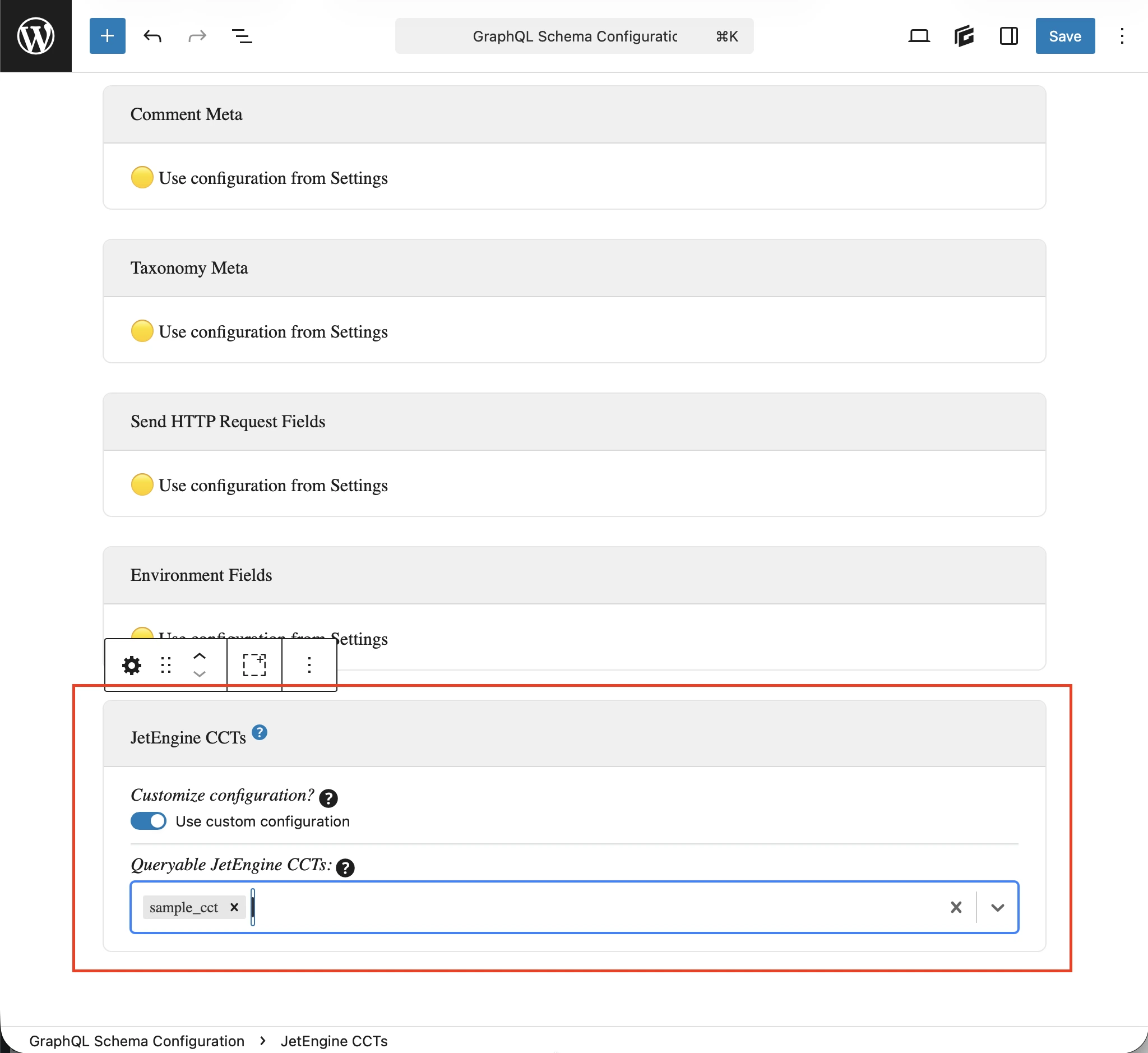
In the Schema Configuration applied to the endpoint, select option Use custom configuration and then input the desired entries:
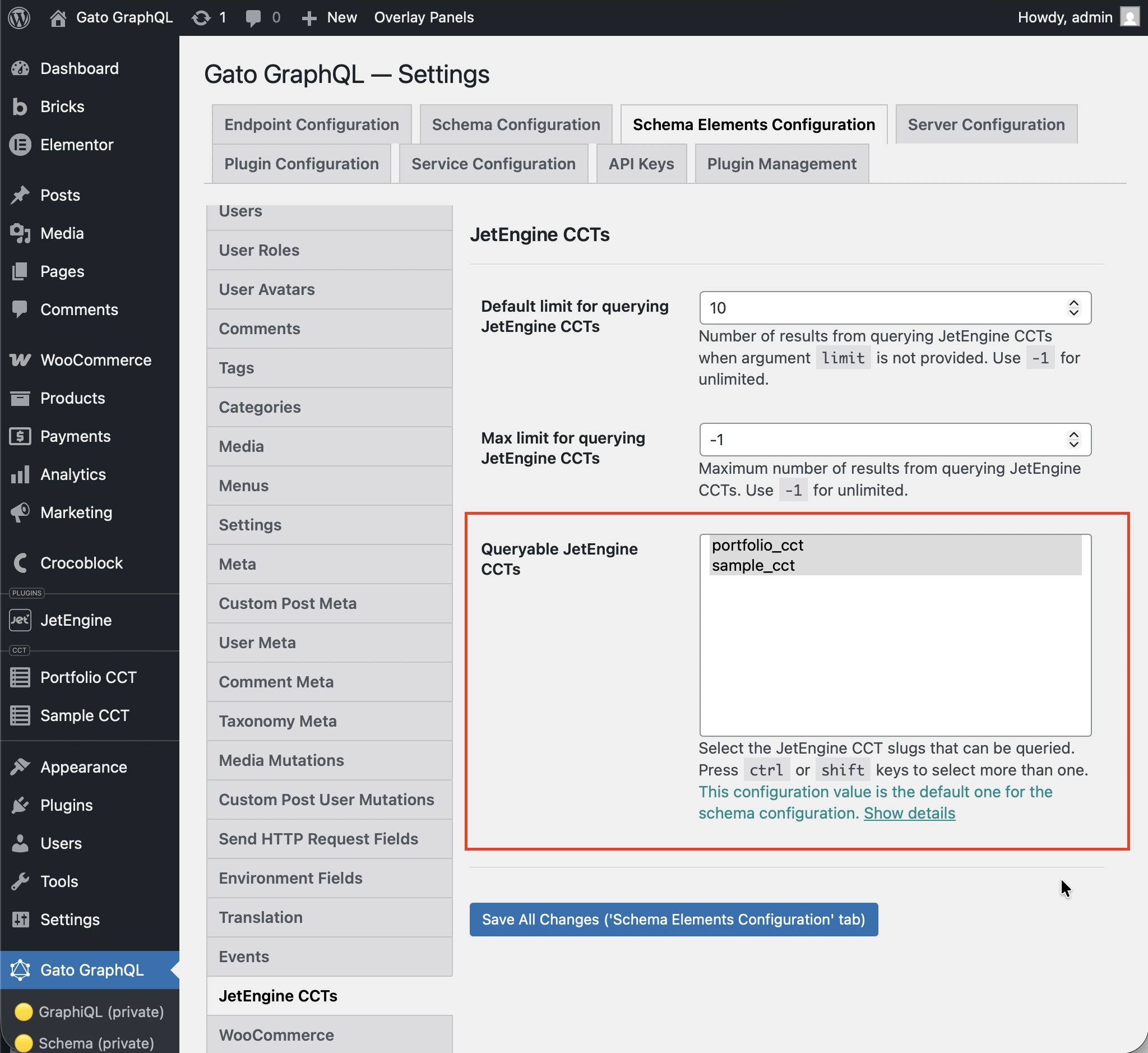
Otherwise, the entries defined in the Queryable JetEngine CCTS option under the JetEngine CCTS section from the Settings will be used:
Example Queries
List CCT entries:
query {
jetengineCCTEntries(cctSlug: "sample_cct") {
id
uniqueID
cctSlug
status
createdDate
modifiedDate
authorID
author {
id
name
}
singleCustomPostID
singleCustomPost {
id
title
}
fieldValues
someField: fieldValue(slug: "some_field_slug")
}
}Single CCT entry by slug and ID:
query {
jetengineCCTEntry(cctSlug: "sample_cct", by: { id: 1 }) {
id
uniqueID
cctSlug
status
createdDate
modifiedDate
author {
id
name
}
singleCustomPost {
id
title
}
fieldValues
someField: fieldValue(slug: "some_field_slug")
}
}List and count CCT entries with filter, pagination, and sort:
query {
jetengineCCTEntryCount(
cctSlug: "sample_cct"
filter: { search: [{ field: "cct_author_id", value: 1, operator: EQUALS }] }
)
jetengineCCTEntries(
cctSlug: "sample_cct"
filter: { search: [{ field: "cct_author_id", value: 1, operator: EQUALS }] }
pagination: { limit: 10, offset: 0 }
sort: { by: "cct_created", order: DESC }
) {
id
authorID
}
}