


🚀 Released Gato GraphQL v18.0: Parsed-query caching, hardened security, and a new Gemini translation provider

Gato GraphQL v18.0 is out 🎉
This release is noticeably faster and uses considerably less memory, lets you cache the parsed GraphQL queries on disk to skip repeated parse and compile work, tightens the default capability checks for the Email Sender, HTTP Client and Environment Variable fields, ships several bug fixes and a few security patches, and adds a new Gemini translation provider plus configurable Request and Connection timeouts for translations.
Read on for the highlights.
⚡ Cache parsed GraphQL queries on disk
Every request must parse the GraphQL query, validate it against the schema, and build the execution plan. v18 can now persist the prepared query to disk and reload it on later runs — skipping the repeated parse and compile work entirely.
Enable it on the Settings page, under Server Configuration > Caching > Cache parsed GraphQL queries?:
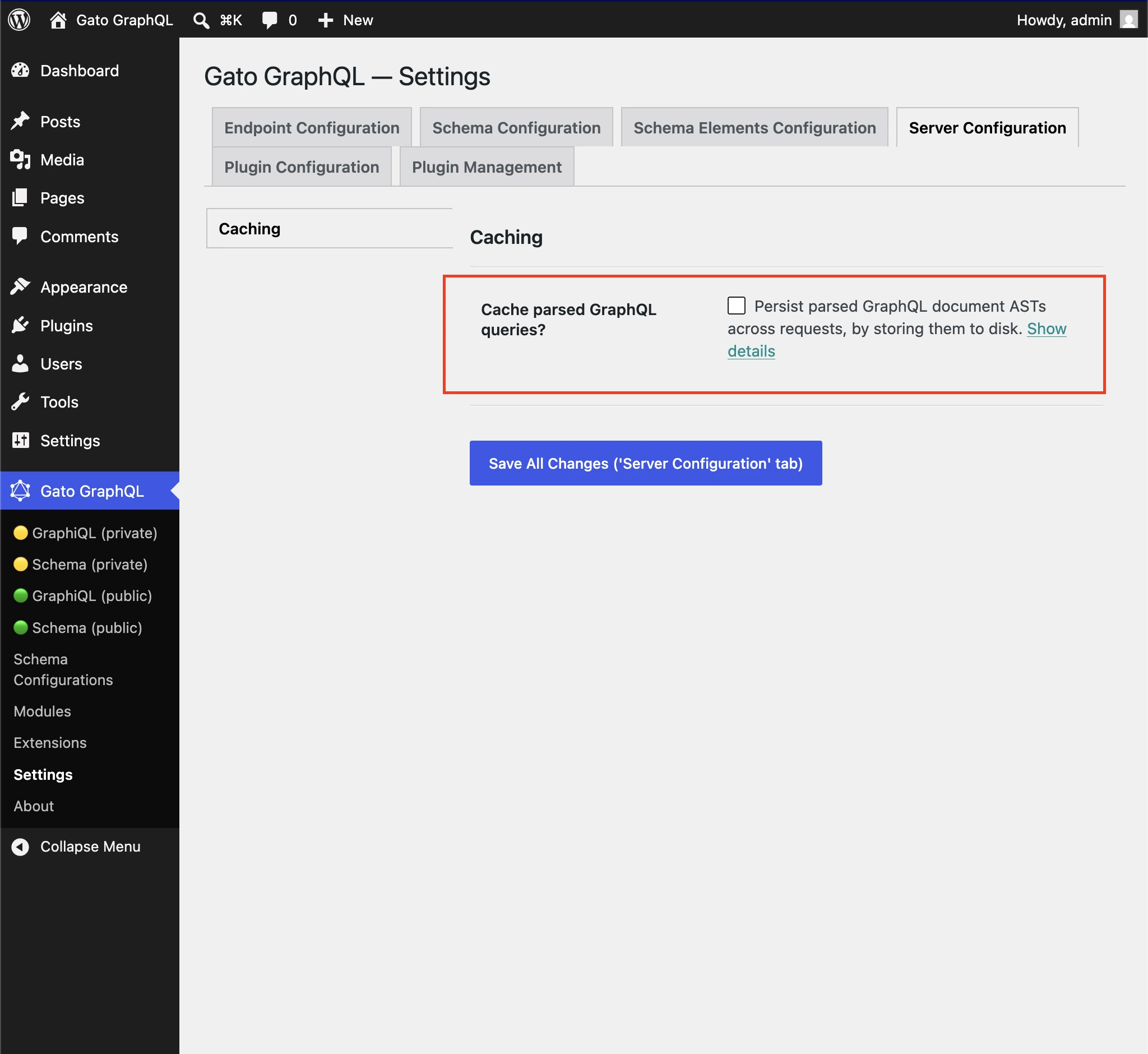
This caches the preparation of the query (parse and compile), not the response data. For HTTP caching of responses, see Adding HTTP caching.
Files go in the plugin cache directory. If the plugin folder is not writable, you can point the cache elsewhere — see Overriding the cache folder.
➡️ Full details in Caching the parsed GraphQL queries.
⚡ Faster and leaner — across the board
Beyond the parsed-query cache, the plugin internals have been overhauled in v18: every GraphQL request is noticeably faster, and consumes considerably less memory.
The gains are global — they apply to every query, every directive, every persisted query — and they're especially visible on large schemas, long queries, and sites that run many GraphQL requests per page (e.g. headless WordPress, internal APIs).
Large sites that previously bumped into PHP memory limits or saw slow response times should feel a real difference, with no configuration changes required — just update the plugin.
🔒 Hardened security defaults
Three areas got stricter defaults so the plugin is safer out of the box.
Email Sender — Required capability
The _sendEmail mutation can now be restricted to users with a specific WordPress capability, configured under Plugin Configuration > Email Sender.
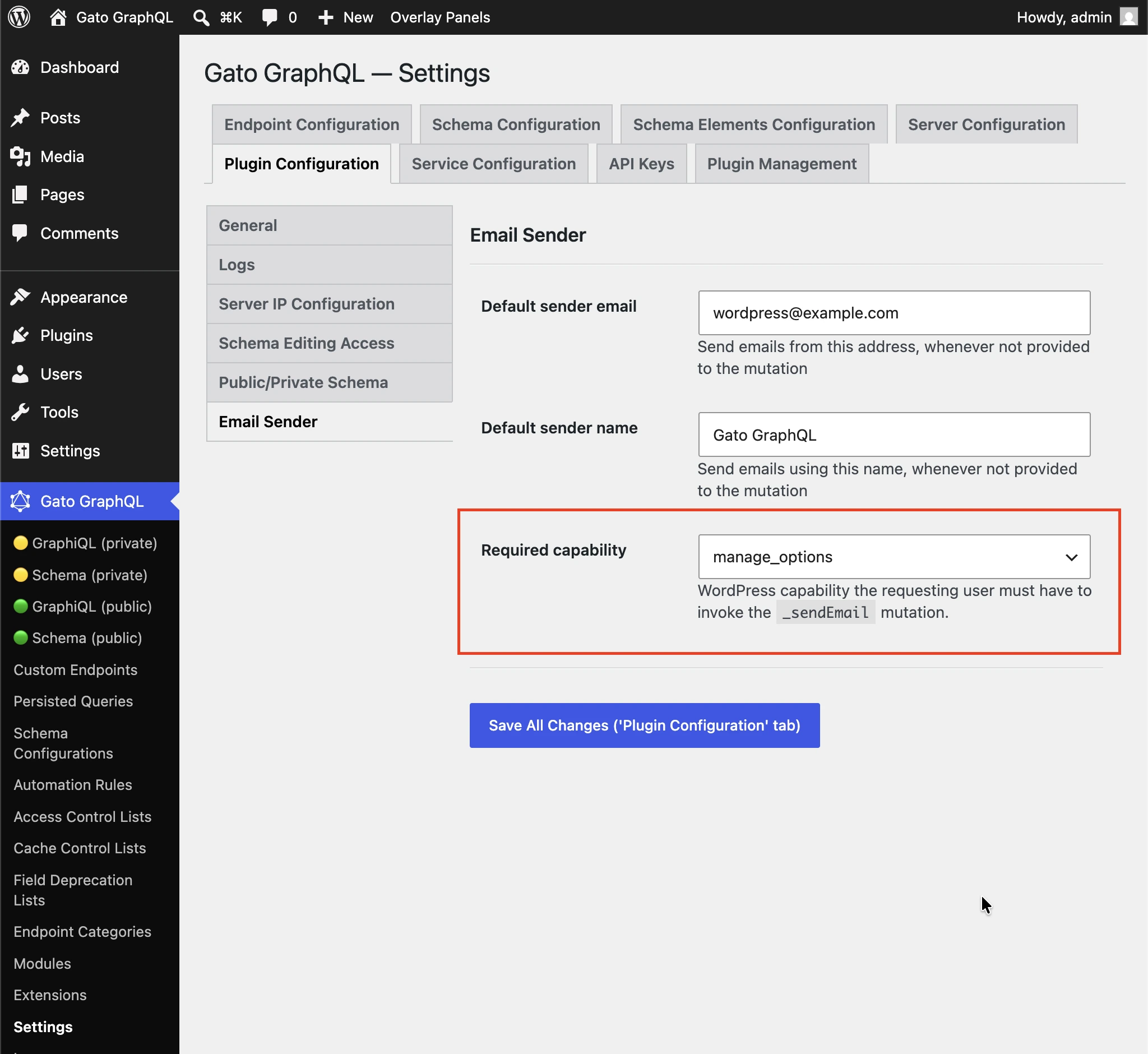
Defaults to manage_options so that subscribers cannot use the mutation to spam arbitrary recipients. Select (any logged-in user) to disable the check.
HTTP Client — Required capability to access internal URLs
Some URLs resolve to internal addresses (127.0.0.1, link-local ranges, cloud-metadata endpoints, etc.) which can expose internal services if reached. A new setting under Plugin Configuration > HTTP Client restricts targeting those addresses to users with a specific WordPress capability.
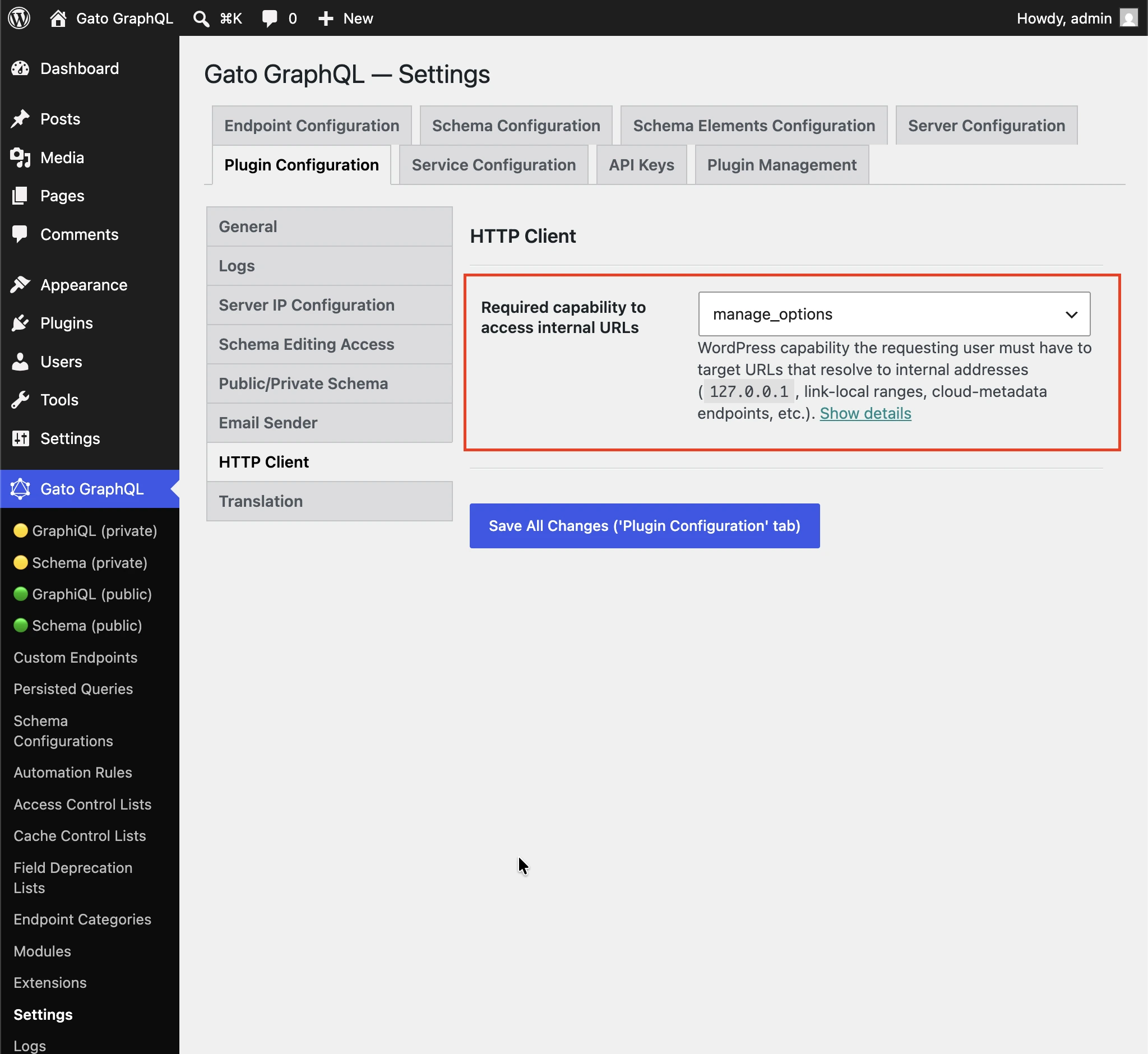
Defaults to manage_options so non-admin users cannot reach internal services through the HTTP Client fields. Select (any logged-in user) to disable the check.
Environment Variables — denylist for non-admin users
The _env field already required an explicit allow-list, and that list is empty by default. v18 adds an additional safety net for non-admin users: even if these names are allow-listed in the configuration, they are denied access.
Always denied (WordPress secrets):
AUTH_KEY, SECURE_AUTH_KEY, LOGGED_IN_KEY, NONCE_KEY, AUTH_SALT, SECURE_AUTH_SALT, LOGGED_IN_SALT, NONCE_SALT, DB_NAME, DB_USER, DB_PASSWORD, DB_HOST, DB_CHARSET, DB_COLLATE.
Also denied — any variable whose name contains: PASSWORD, PASSWD, SECRET, PRIVATE_KEY, API_KEY, APIKEY, ACCESS_KEY, ACCESS_TOKEN, AUTH_TOKEN, BEARER, CREDENTIAL, SALT.
Admin users continue to have full access.
➡️ See the Security section of the docs for the full list.
🌐 Translation: new Gemini provider
The @strTranslate directive now supports Google Gemini as a translation provider, alongside ChatGPT, Claude, DeepL, DeepSeek, Google Translate, Mistral, OpenRouter and self-hosted LLMs.
Translate any String field to the desired language:
{
posts {
title @strTranslate(
from: "en",
to: "fr",
provider: gemini
)
content @strTranslate(
from: "en",
to: "fr",
provider: gemini
)
}
}The following Gemini models are supported:
- Gemini 2.0 Flash (
gemini-2.0-flash) - Gemini 2.0 Flash-Lite (
gemini-2.0-flash-lite) - Gemini 2.5 Flash (
gemini-2.5-flash) - Gemini 2.5 Flash-Lite (
gemini-2.5-flash-lite) - Gemini 2.5 Pro (
gemini-2.5-pro) - Gemini 3.1 Flash-Lite (
gemini-3.1-flash-lite)
Configure your Google API key (via Settings, wp-config.php, or environment variable), pick a model, and you are ready to translate.
➡️ See the Gemini Translation reference docs.
⏱️ Translation: Request and Connection timeouts
Translating a long document through a 3rd-party provider can be slow, and a hung upstream would otherwise hold a PHP worker until PHP itself kills the request — yielding a generic HTTP 502 / 504 or a blank "Maximum execution time exceeded" page.
v18 exposes two timeout settings under Plugin Configuration > Translation:
- Request timeout: maximum time (in seconds) to wait for the full response from the translation provider.
- Connection timeout: maximum time (in seconds) to wait when establishing the connection.
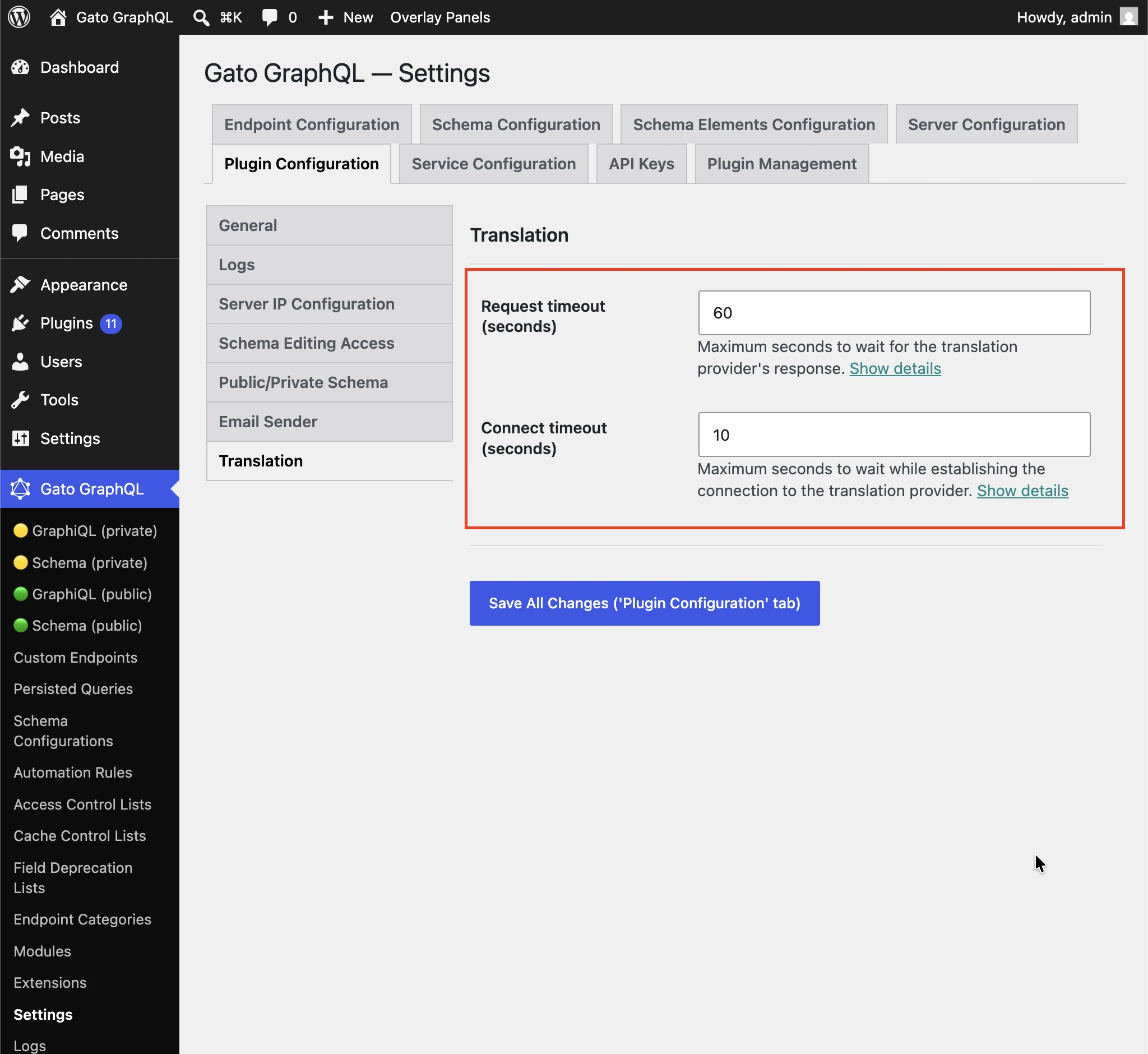
Keep both values slightly below your server's max_execution_time so a stalled translation fails cleanly with a controlled error in the logs instead of triggering the generic server timeout. If your translations regularly time out, raise both these values and your server's max_execution_time in tandem.
🐛 Bug fixes and security patches
In addition to the new features above, v18.0 also ships several bug fixes and patches a few security vulnerabilities. We strongly recommend updating to v18 as soon as possible.
Upgrade
The release is rolling out now through the WordPress plugin directory and your customer dashboard. Update from your WordPress admin (Plugins → Updates), or download the latest version from your account.
See the changelog for the full list of changes.
Enjoy v18! 🎉